What your job opens to you
Composable roles that can be combined: team member, team manager, HR, sales, project manager, administrator. They carry general permissions, access to modules, administration, and access to sensitive HR data.

A project always links two organizations: the one that delivers and the one that orders. Both work on the same data, each with its own rights. The supplier steers contracts, production, schedule, maintenance, financials and its internal organization; the client follows progress and validates whatever is submitted to them: minutes, change orders, interventions.
Projects, work packages and tasks with their dated milestones, the risks made visible to the client, the monthly weather, orders and financial items, meetings and committees, actions.
The supplier's internal data: HR, team management, workload and production, margins, private milestones, internal reporting. They stay invisible to the client.
Who sees what is not set in a matrix maintained by hand. Rights follow from two memberships: the role held in the organization, and the position held in the project's governance.
Composable roles that can be combined: team member, team manager, HR, sales, project manager, administrator. They carry general permissions, access to modules, administration, and access to sensitive HR data.
Five positions, on the supplier side as on the client side: Sponsor, Sales, Project Director, Project Manager, Tracking Lead. Holding a position automatically grants the associated rights: steering the tracking, writing the financials, validating at committee.
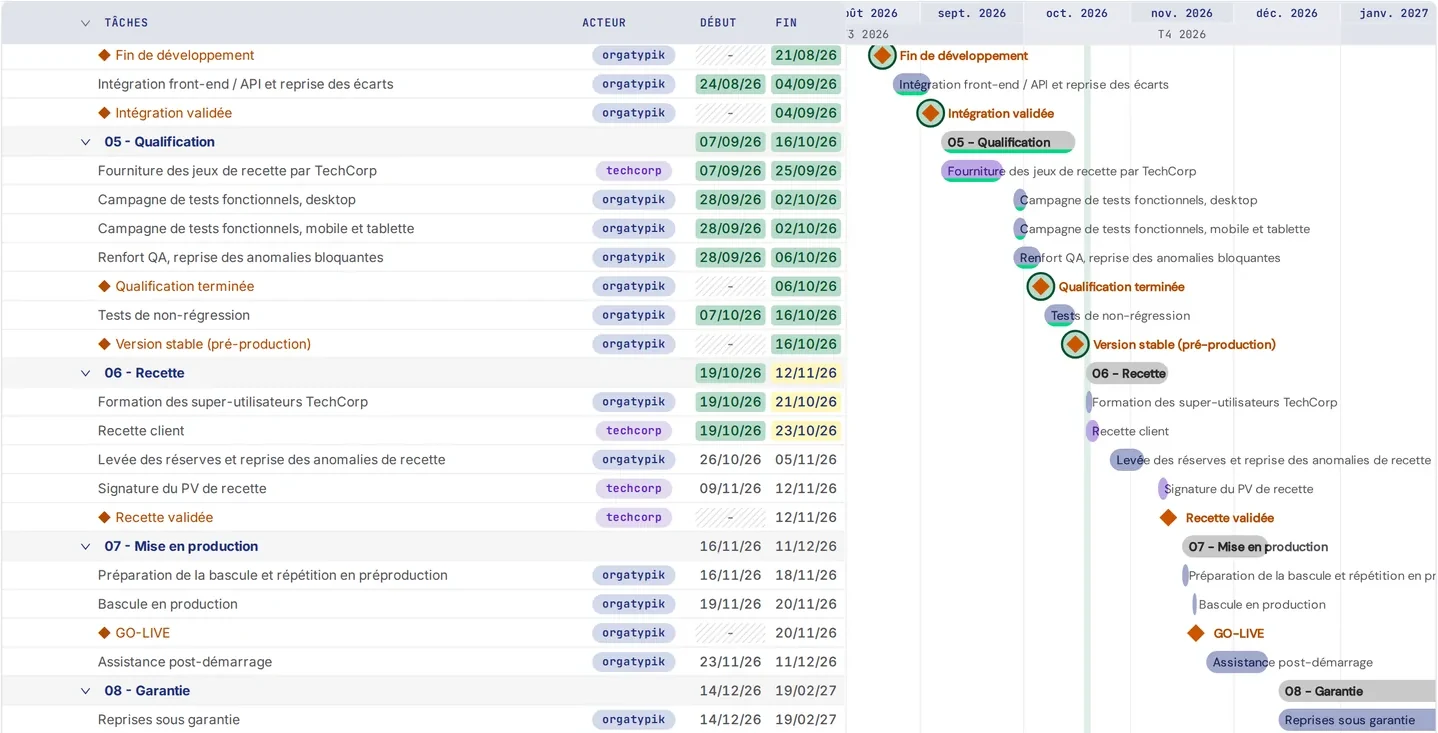
A project links a supplier and a client, and breaks down into work packages, tasks, phases and milestones, with a launch and a closure. Milestone templates by project type and reusable schedule templates save you from starting from scratch.
Tracking, Gantt chart, contractual milestones and dependencies between the tasks of a single project, tracked in the Planning.
A project split into several work packages; linked projects, run for different clients or by your own suppliers; dependencies from one project to another. No client sees the link.
"Starts after", "only reaches after": a dependency flags a conflict, and moves no date without a decision.
Each project has its contract, where the billing mode is chosen, and maintenance contracts are part of the core. In addition, a light Interventions module, from the Business tier, schedules interventions and has their completion signed off by the client.
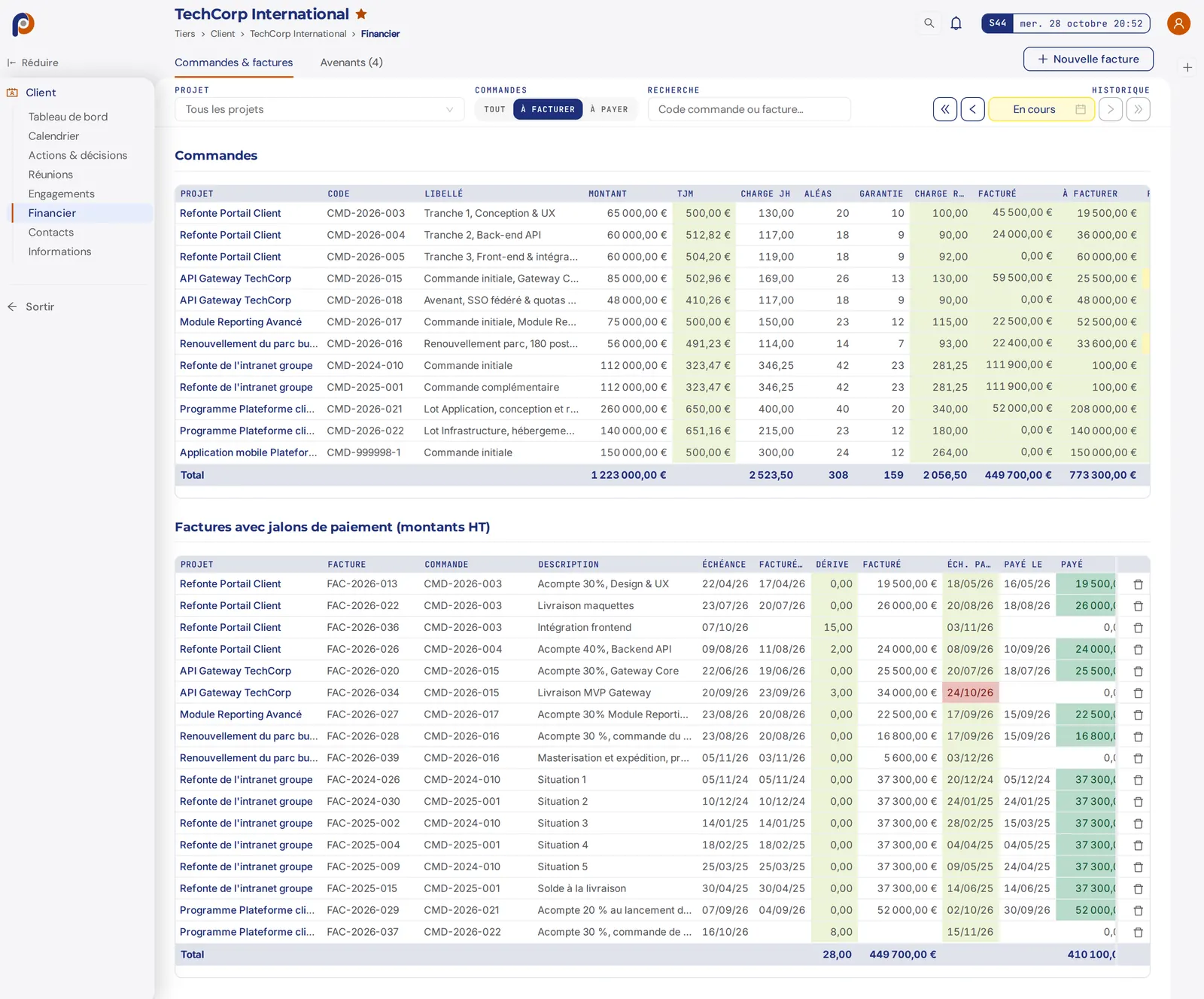
Fixed-price: a payment schedule tied to milestones; time-and-materials: a monthly schedule computed from the days produced and each profile's rate. Ordered, invoiced, paid, balance due and margin at completion.
Period, purchase order, volume in days, catalog of authorized interventions, roles on both sides, a maintenance committee, and indicators frozen at each committee, read by the client.
A light module: the intervention is scheduled by the half day against real workload, then the client signs off its completion, on the technician's phone, from their client access or on paper, or refuses it with a reason. It is not an advanced or qualified electronic signature.
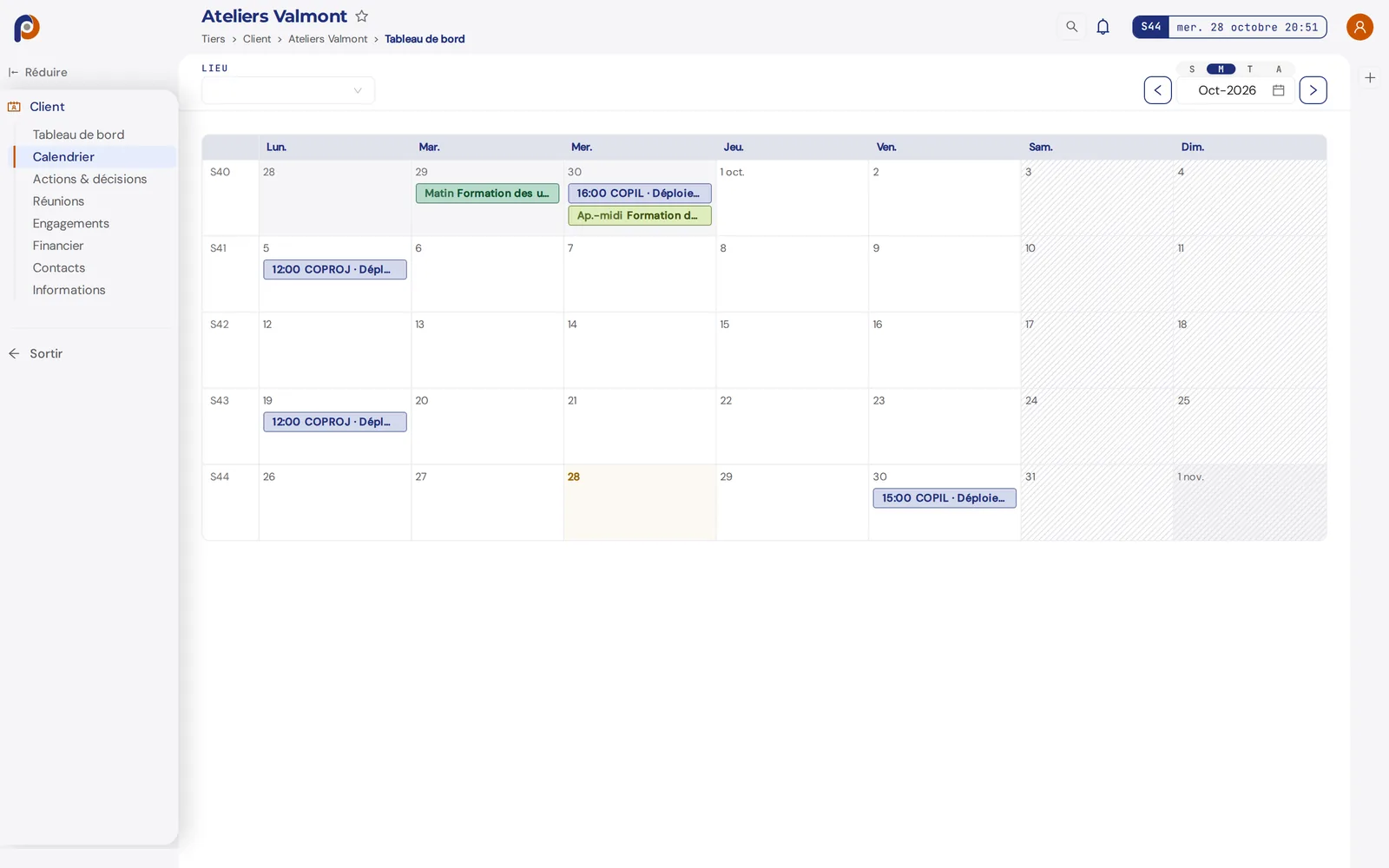
Meetings and interventions live in the calendars of the people they concern, with their location: at the client's, on your premises or remote.
The meetings you are invited to and your own interventions, by the week hour by hour, by the month, by the quarter or as an agenda, filterable by location.
The project's meetings and, on the supplier side, the interventions of its contract.
A third party's meetings and those of its projects, readable by the client as well as the supplier; interventions, on the supplier side.
Each organization has its own space, and the sidebar shows only the modules opened by its two axes of rights. Six base modules, a single data set, and the Interventions and Extended Project modules from the Business tier; the tour below is that of a user who would have them all.
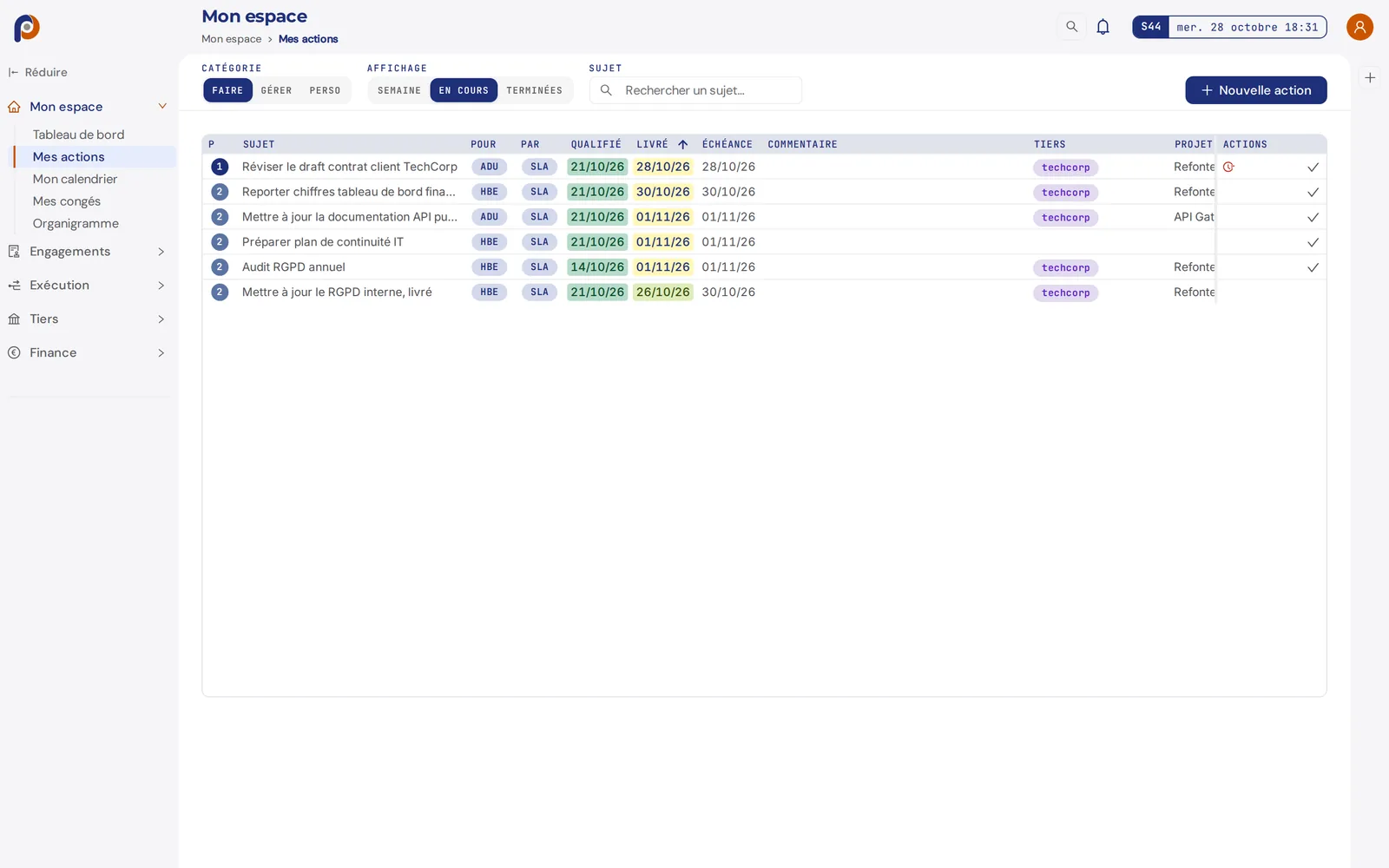
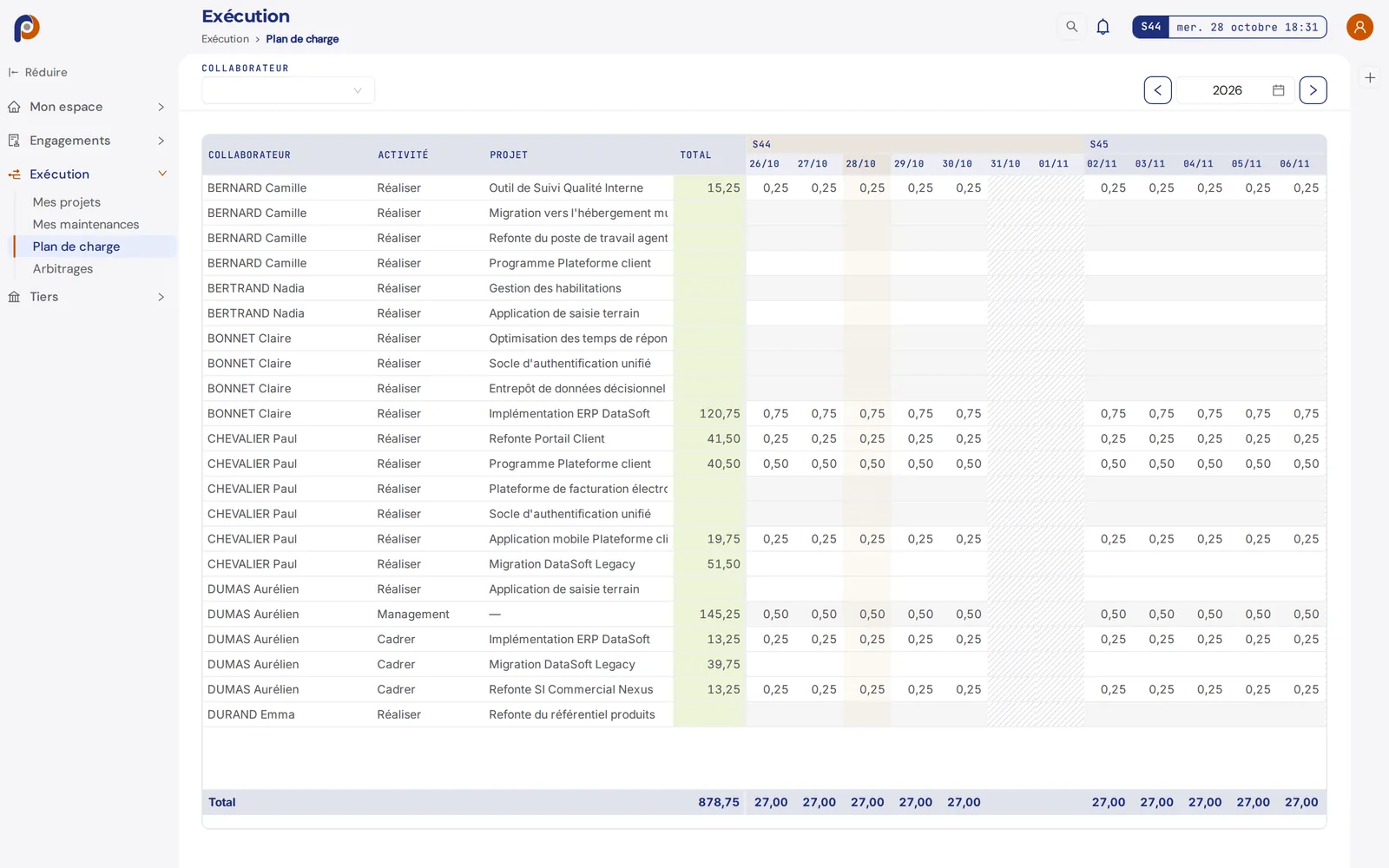
Workload plan, time entry, weekly reporting, actions to handle, to-dos and leave requests. It is the surface of a team member, and the starting point of every day for a Pilot.
"My clients" and "My suppliers". A third party's record mirrors the project record at the level of the relationship: production and billing progress of the projects, financial overview, revenue by year, place in the portfolio, contacts, calendar, meetings, actions and decisions.
An overview of budgets consumed, delays and workload; consolidated multi-project financial reporting. Each project opens its own space, where most of the features described below take place.
Tracking of actions and workload, forecast workload plan weeks × resources, production achieved, weekly review of team reports, monthly review of time, leave management.
Directory of employees and teams, cross-cutting follow-up combining the week's situation and the weekly reports, a historized HR journal. Sensitive data, such as salaries and bank details, is protected by dedicated permissions and its access is audited.
Orders, change orders and invoices with their statuses. Four indicators (ordered, produced, invoiced, paid) and the consumed versus sold gap, computed from time entry. The monthly history is frozen at each validated steering committee.
Modules are the spaces; features are what you do in them. They recur, combined, from one module to another. Here are the main ones.
A hierarchical grid, work packages then tasks, whose milestone columns are configurable by project type. At each committee, the tracking state is historized with the minutes, and the history can be browsed from one committee to the next.
Gantt chart, dependencies between tasks, contractual milestones, and the workload per resource set against the forecast plan.
Category, probability, criticality, treatment strategy, estimated effort, and a chosen visibility: internal to the supplier, or shared with the client.
A full life cycle: draft, scheduled, in progress, submitted for client review, validated or rejected with a reason. Once submitted, the minutes are immutable; a correction goes through a new cycle.
A requester, an assignee, a priority, an attachment. Three steps: qualification, completion, then validation by the requester or the client. A complete journal: who did what, when, and with what reason.
Project information, responsibility matrix, contractual settings built into the steering: project types, milestones, payment terms, daily rates.
Drifts in workload, deadline and scope are flagged as they form, not at closure, while there is still time to act.
Each team member declares their time where they produce. The data feeds workload, margin and reporting with no double entry.
Multi-year monthly review, automatic analytical aggregates, margin computed at entry. The consumed versus sold gap is no longer discovered at invoicing.
Not an exhaustive list: project weather, satisfaction surveys, org chart, leave workflow, audit log and many more complete each module. The whole is best discovered in a demo.
Commitment management takes nobody's side: it protects both parties because they read the same thing, at the same moment, on data that belongs to neither of them.
It steers its teams, produces, reports, and lays down dated facts as the work goes on. It alone holds progress, milestones and history.
It accesses the same facts and sees dates and decisions before they turn into reproaches. It validates or refuses what is submitted to it, minutes, interventions, change orders, and carries the actions that fall to it.
Hosted with neither party. That is what makes the trace enforceable on both sides of the contractual link.
Most tools require you to buy licenses for your clients, or settle for exporting a PDF to send. With pylotik, the client is invited free of charge: their organization is hosted by yours and can later become an autonomous, paying organization, with no migration and no data loss.
Your supplier can do the same with you, if they use pylotik. The same tool orchestrates both sides of the contractual link, subcontracting included. No technical interface to maintain between the two sides: the data acts as the bridge.
Governance positions on the client side open exactly the rights needed, no more, no less.
Available today, at m.pylotik.com. It does not replicate the web: it targets frequent, short gestures. The week's home screen, actions and their cycle, time entered by the week from the workload plan, the weekly report, leave, team review and requests for managers, and interventions, which the client can validate on the technician's phone. It is a web application, with no app store, that you add to your home screen.
Automatic saving: no "Save" button. Each field is saved when you leave it. Only sending is an explicit act.
Per-user preferences, respected across the whole interface, tables included: language (French, English), font size, vertical spacing, horizontal spacing and light or dark mode. The interface is available in French and English, at each user's choice.
The field lives by the week, the executive team through the lens of the month. Both read the same base: nobody reconstructs anything for the other.
Everything entered automatically feeds the historization, the monthly review, the overview, the client access and the per-client reporting. No data is duplicated, none is lost.
pylotik HR follow-up does not collect one more opinion. It holds two readings of the same scope side by side: the manager's reading of their team, and the team's reading of itself. It is the gap between them that carries the information.
Workload, production, points of attention, staffing situation. The manager keeps the state of their team in the same motion as they keep their projects, with no extra meeting and no parallel spreadsheet.
A few minutes on Friday, on the web or from mobile: what moved forward, what got stuck, and in what tone. The report belongs to the person who writes it, and it is read: by the manager, and by the human resources department.
The two flows are brought together on the same scope and the same week. When the manager's account and the team's diverge, the gap appears while it is still a conversation, not once it has become a resignation. No one is ranked or graded: each person's voice stays attached to its author, and it serves first to be heard.
Many teams and many companies are young. They master their trade, but do not yet have the steering maturity that goes with it, because it takes years of rituals actually held. That is precisely what the cycle described above installs, with no seminar and no consultancy.
The week and the month come back, whether you like it or not. At each turn, the same discipline: a frozen state, a committee that is held, dated commitments, a margin recalculated. What was an effort of will becomes a house habit.
The project manager does not need to have read the framework: they open their tracking on Monday and prepare their committee in a few minutes. The method is not taught, it is embedded in the gesture, and it outlives the person who carried it.
The framework was not invented for software: it is the digitization of good steering practices, proven in organizations assessed against recognized frameworks, then applied for twenty-five years to structure a young organization, industrialize one that grows too fast, or turn around one that is slipping. We kept what held under pressure.
Steering maturity can be measured, and its effect is cumulative: it shows from the outside. It is what separates, at PMI, the organizations that waste little from those that waste up to twenty-eight times more.
SOURCE PMI, Pulse of the Profession 2017.
The product is in service. We are opening demos to organizations that deliver commitment-based projects.